trawl
Set trawl's SEARXNG_BASE_URL to the SpecStream address and its web, image and video searches run on the SpecStream Search API. trawl's search code stays as it is, and searching no longer needs a SearXNG instance of your own.
SpecStream for trawlAI assistants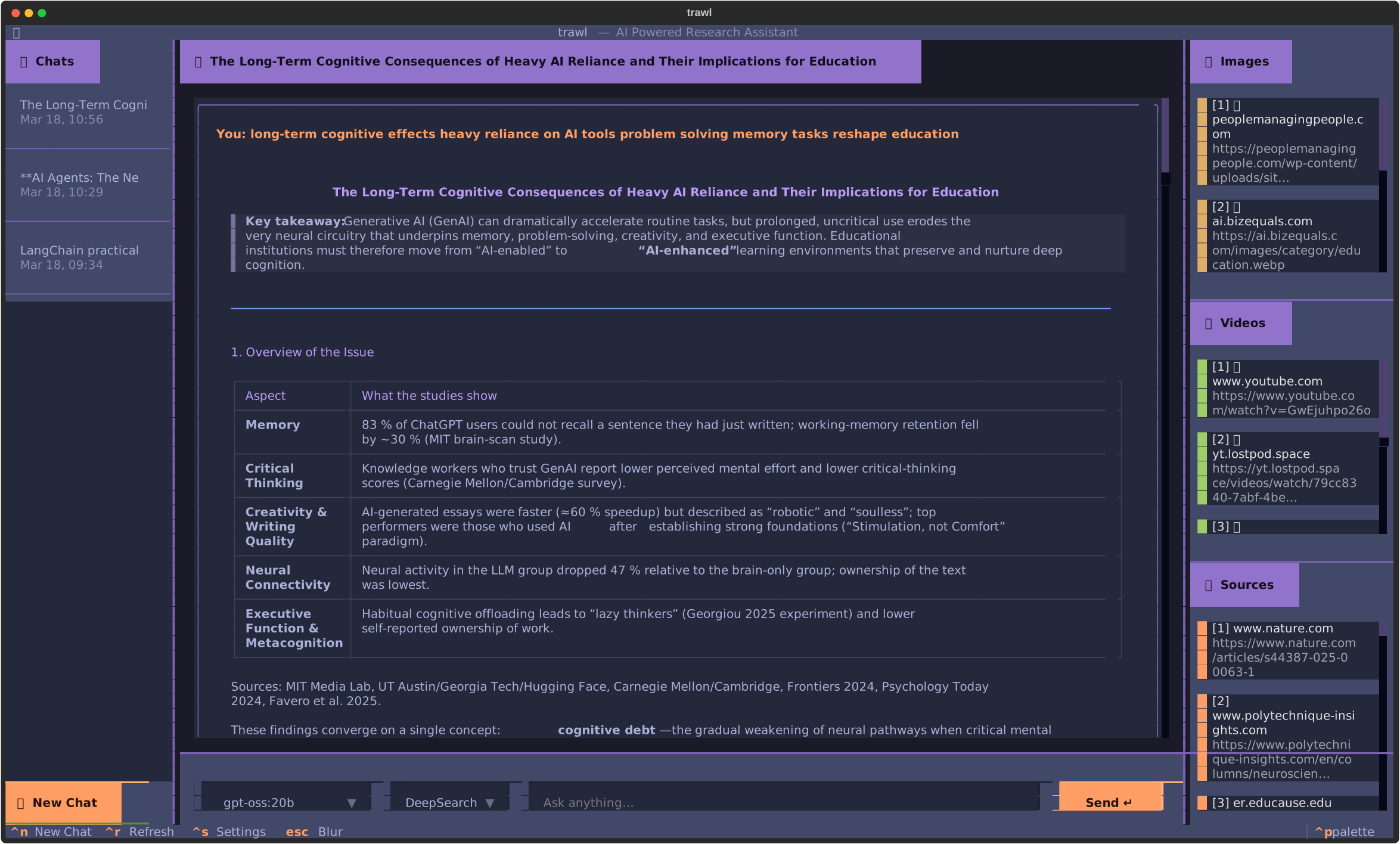
What you need
- trawl, run with Docker (
docker compose up -d) or installed withuv syncand a.envcopied from.env.example. - A SpecStream key. Get your key on the Search API screen of your SpecStream workspace. New accounts start with $10 of credit, no card.
- 1
1. Installed with uv: set SEARXNG_BASE_URL in .env
In trawl's
.env, replacehttp://localhost:8888with the SpecStream address, and put your key in place ofYOUR_SPECSTREAM_KEY. Leave off/searchand any slash at the end, because trawl adds/searchitself.trawl's
.gitignorealready keeps.envout of git. The address holds your key, so keep the file out of anything you share..env - 2
2. With Docker: change the backend's line in docker-compose.yml
With Docker, a change to
.envdoes not reach the search code.docker-compose.ymlsetsSEARXNG_BASE_URL=http://searxng:8080in the backend'senvironment, and trawl'sload_dotenv()does not replace a variable that is already set. Change that line instead.Git tracks
docker-compose.yml, so write the key there as a variable. Then addSPECSTREAM_API_KEY=YOUR_SPECSTREAM_KEYto the.envbeside it. Docker Compose fills${SPECSTREAM_API_KEY}from.env, as it already does forGOOGLE_API_KEY.docker-compose.yml, under backend - 3
3. Restart trawl
trawl reads the address when it starts. With Docker, run
docker compose up -dagain. Compose sees that the environment changed and recreates the backend.Installed with uv,
trawl researchreads.enveach time it runs. Iftrawl-apiortrawl tuiis already running, stop it and start it again. - 4
4. Ask a question that needs the web
Ask about something recent so trawl has to search. The Sources panel lists the pages the Search API returned. Add
--deepto run DeepSearch.Shell
What trawl sends and what comes back
trawl's search code in trawl/services/search.py does not change. Each research run sends three searches to SEARXNG_BASE_URL plus /search, all with format=json: a web search, an image search with categories=images and a video search with categories=videos. SpecStream answers each one in SearXNG's JSON shape. trawl reads url from the web results and img_src from the image results.
SpecStream has no video category. The video search gets web results for trawl's video query, so the links trawl shows as videos are pages on that topic, and some of them are video pages.
SpecStream returns 10 web results per search, and trawl keeps up to 15. A research run therefore reads up to 10 pages, and DeepSearch, which runs three web searches, reads up to 30. trawl's README counts 45 for DeepSearch on its own SearXNG. trawl fetches and reads those pages itself, from your machine.
What each research run costs
The SearXNG address runs the Search API's fast tier, at $1 per 1,000 searches of up to 10 results. trawl's image search does not name a count, so it gets SearXNG's page of up to 100 images. A search with 100 results costs $0.0118, and a search that returns fewer costs less.
Calls come out of your balance with no quote and no approval. Every call, charged or not, is in your account's request log. Prices are on the pricing page.
| Mode | Searches per run | Most a run costs |
|---|---|---|
| trawl research | 1 web, 1 image, 1 video | $0.0138 |
| trawl research with --deep | 3 web, 1 image, 1 video | $0.0158 |
Why stop running SearXNG for trawl
trawl's Docker stack runs a SearXNG container, with Redis beside it, as its search engine. That instance passes each query to public search engines from your own address, and those engines can answer automated traffic with CAPTCHAs, which leave trawl with no sources. An install with uv needs a SearXNG instance with JSON turned on in settings.yml, and SearXNG's own docs note that many public instances have it off.
With SpecStream, the searches run on SpecStream's servers and the JSON format is always on.
With Docker, the searxng and redis containers still start, because the backend's depends_on waits for SearXNG to report healthy. To stop running them, delete searxng from the backend's depends_on, delete the two services, and run docker compose up -d --remove-orphans.
Limits and errors
- If a research run stops at Searching the web with
KeyError: 'results', SpecStream refused the call and answered with anerrorfield in place of results. Check the key in the address and your balance. - When the account has used its calls for the minute, SpecStream answers
429withRetry-After. trawl does not retry on its own, so wait that many seconds and run the question again. - DeepSearch catches errors one vertical at a time, so a refused search shows as a vertical with no sources, not as an error.
- If trawl cannot connect, check that
SEARXNG_BASE_URLstarts withhttps://api.specstream.ai/searxng/and has no slash at the end.
Go back to your own SearXNG
Set SEARXNG_BASE_URL back to http://localhost:8888 in .env, or to http://searxng:8080 in docker-compose.yml, and restart trawl. For questions, write to [email protected].
More
SpecStream for trawl covers what it does in trawl on one page. Every other tool has its guide in Connect your tools. You see the most a request can cost before it starts, and the matches are paid from your balance. Billing has the details. For help, email [email protected].