Linear
Put live web data on the issue that needs it: the accounts to call, the vendors to compare, the competitors to watch. Mention @SpecStream with what to find, say yes to the price, and the results land in the thread, each value linked to the page it came from.
Add SpecStream
- A Linear workspace admin opens Add SpecStream to Linear (opens in a new tab) and approves it. SpecStream joins the workspace as its own app user, so it doesn't take a seat.
- Sign in to SpecStream, or create an account, and approve the connection. Starting is free: new accounts get $10 of work, no card.
- Choose which teams SpecStream can see in Linear under Settings > Applications.
The whole Linear workspace works with the SpecStream account that approved the connection, and what it finds is paid from that account.
Ask on an issue
Mention @SpecStream in a comment with what to find, in plain words. For example: @SpecStream every roofer in Columbus, Ohio rated 4.5 or better, with their phone
You can also assign the issue to SpecStream. It reads the issue's title and description as the request, and you stay the issue's owner.
Approve the price
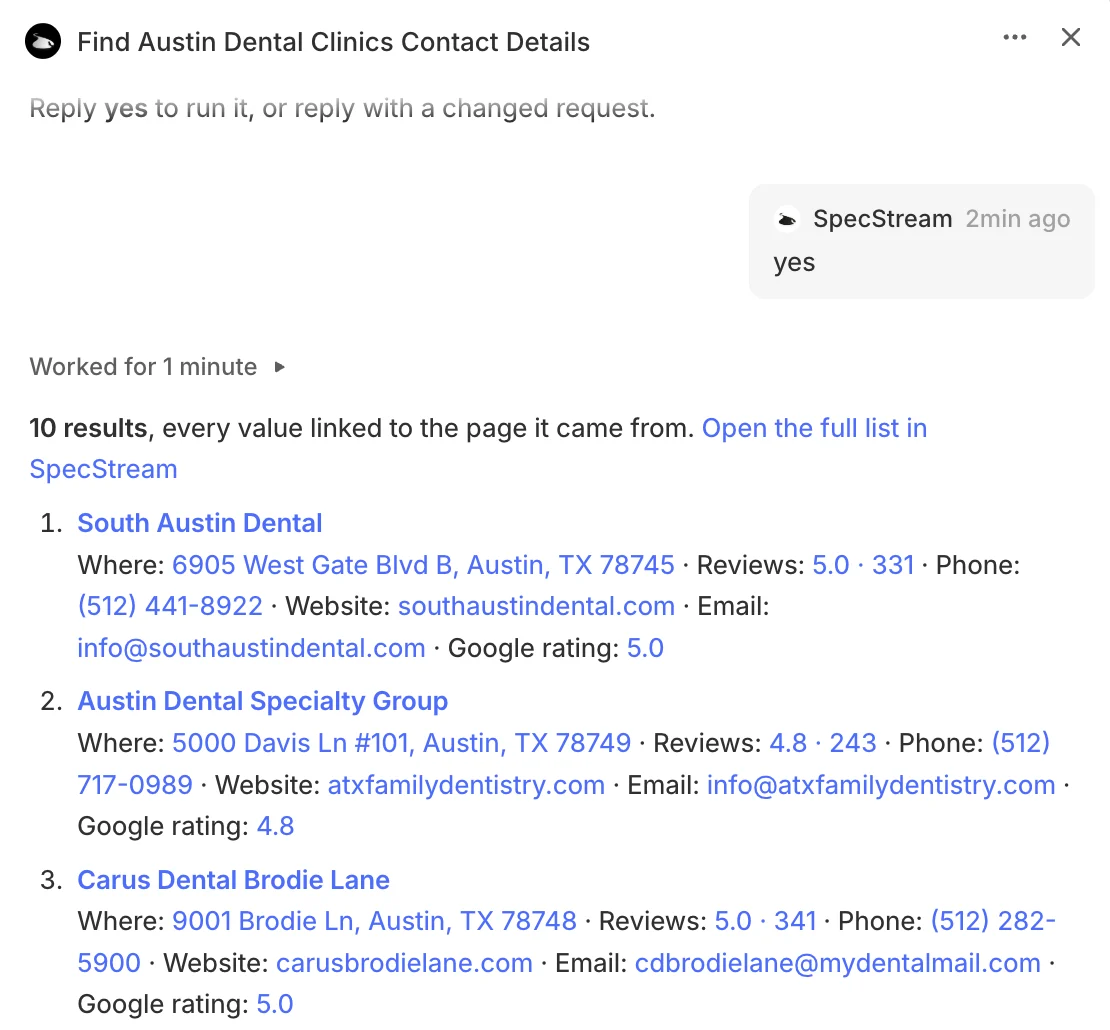
SpecStream answers in the thread with how it read the request and the most it can cost, for example Up to $2.50 for up to 25 results. Reply yes to run it. Any other reply is read as a changed request and gets a new price; reply no to drop it. Nothing runs before a yes, and a second yes never starts a second run.
Results in the thread
While it runs, the thread shows how many results SpecStream has found and links to the list in your SpecStream workspace. When it finishes, SpecStream posts the first 25 results, each value linked to the page it was read on, and a link to the full list, where you can export it or keep it current.
Permissions and data
SpecStream asks Linear to read and write (read, write) and to be mentioned and assigned (app:mentionable, app:assignable). It reads the issue and comment that start a session and writes only to that session. SpecStream acts only on webhooks that carry Linear's signature and aren't too old.
The Linear token and the link to your SpecStream account are stored encrypted on SpecStream's servers. See the privacy policy and security.
How SpecStream uses AI
SpecStream uses AI models to read your request and the pages it collects, so results can be wrong. Every value carries the page it came from, so you can open the source before you rely on it. The AI services SpecStream uses don't keep what they read and may not train their models on it.
Cost
The app is free. Requests are paid from your SpecStream balance, only for the results that match, and a search that finds nothing is free. See pricing and balance, quotes and billing.
Remove SpecStream
An admin opens Settings > Applications in Linear and revokes SpecStream. SpecStream deletes its link to the workspace when Linear tells it, and results already posted stay in their threads. The other tools SpecStream works with are in Connect your tools. For help, email [email protected].