

SpecStream for ZendeskComing soon
SpecStream looks up the company behind a Zendesk ticket on the live web: website, employee count, industry, headquarters, year founded and latest funding round. Save the values you want to the organization's fields.
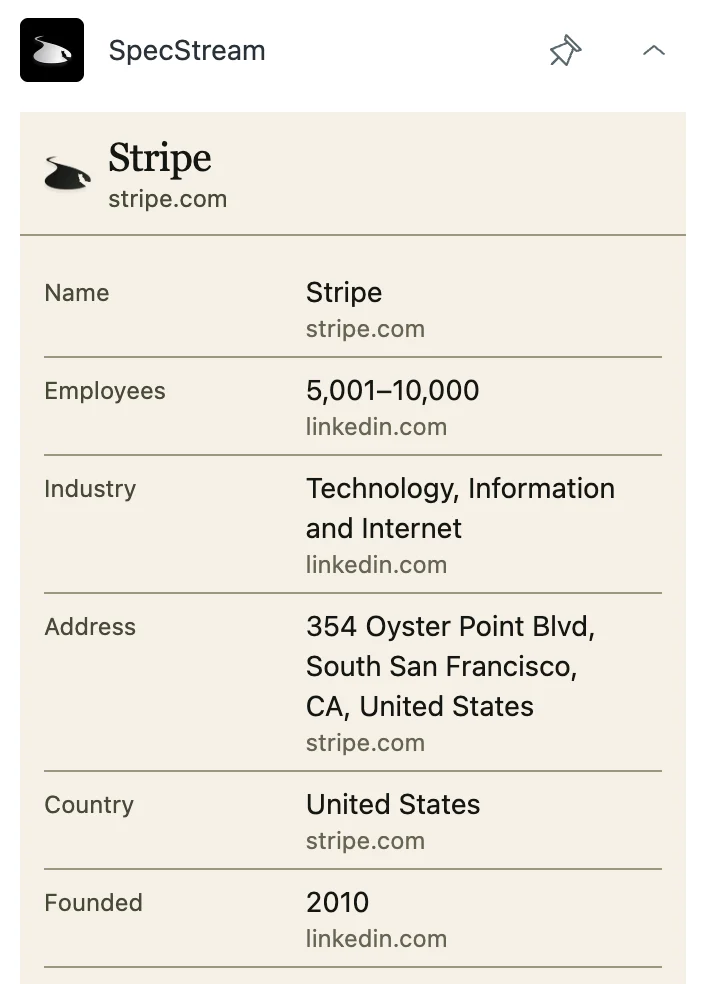
What you get
- Organization fields by nameFields named Website, Employees, Industry, Funding, Founded, Country, Headquarters, or LinkedIn match on their own. Tick the ones to fill and click Save.
- Runs while you workLeave the ticket mid-lookup and it keeps going. Reopen the ticket in the same browser and the results are waiting, each value next to the website it was read on.
- One key for every agentAn admin installs once with a SpecStream API key. Zendesk keeps it as a secure setting, so agents look up companies without ever seeing it.
Set it up
- Create an API key under Agents & API in your SpecStream workspace.
- Install SpecStream from the Zendesk Marketplace and paste the key into SpecStream API key.
- Open a ticket. SpecStream waits in the apps panel with the request written from the organization or the requester's email domain.
The full setup guide has every step, with what to do if something doesn’t arrive.
Related integrations
See all- SlackAsk with /specstream, new matches posted to a channel
- LinearMention @SpecStream, results posted in the issue thread
- JiraComing soonThe SpecStream agent in Rovo chat, results as a table
- AsanaComing soonEvery record as a subtask, its source in the description
- IntercomComing soonThe company behind a conversation, as an internal note
- ZoomComing soon/specstream in Team Chat, results as a CSV




Live web data, in Zendesk
Ask in your own words for companies, places, people, filings or anything else the web lists. You see the price before anything runs and pay only for the matches.